Reduce Support Response Time with Live Chat

Give shoppers instant help while they browse your store, so support issues get resolved on the spot and fewer orders slip away due to delays.

With real-time chat, you can answer while shoppers hesitate, compare products, or get stuck at checkout, instead of sending them to email and making them wait.

One Support Workflow, Not a Separate Chat Tool

When storefront conversations live in a separate tool, your support process splits in two. Agents switch tabs, copy details, and lose time figuring out who owns the conversation and what happens next.

Conversations follow the same workflow as your other support requests. New messages land in your ticket list, you can transfer the conversation to another agent when needed, and internal notes help teammates stay aligned without exposing anything to the customer.

If no one is available, the chat window collects a message and adds it to the same queue, so the team can respond later without letting the request slip. If you also handle email and contact forms, Unified Inbox brings everything into one shared list.

live chat dashboard

Faster Replies with Full Customer Context

Start each conversation with real context instead of guesses. You can see what the person is doing on the site, what happened before, and collect only the missing detail up front, so you can get to the point right away.

Reduce Support Response Time with Live Chat Mipler Reports live chat fast replies

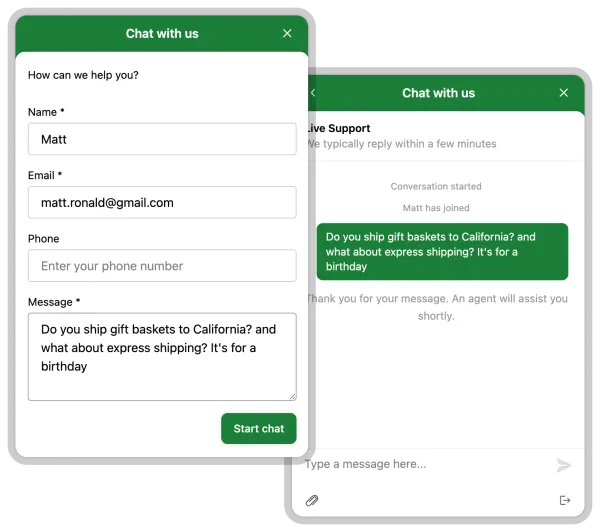
Pre-Chat Form

Ask for the one or two details you cannot reliably infer, like an order number or topic, so you do not spend the first minutes going back and forth just to identify the request.

pre-chat forms

Visitor Path and Current Activity

See which pages a visitor is viewing and where they have been, so you understand what they are trying to do and avoid sending them to steps they already tried.

Conversation History

Keep the full thread in one place, so you can pick up the conversation later with the same context and keep your answers consistent.

Customer and Environment Details

See shopper info alongside technical details like browser and OS, which helps when an issue depends on device or compatibility and you need a quick clue for troubleshooting or escalation.

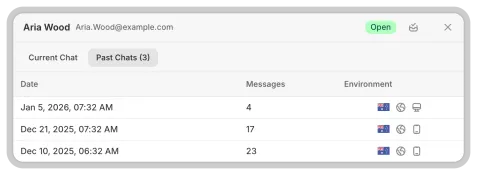
Previous Chats

Open earlier conversations with the same shopper to understand what was already suggested or promised. This keeps answers consistent and saves time when a chat gets interrupted or the same question comes up again.

previous chats

Productive Agent Experience

When you handle multiple conversations at once, what matters most is staying oriented. Clear cues, quick access, and ready-to-send answers help you keep a steady pace without missing messages or draining your focus.

productive agent experience

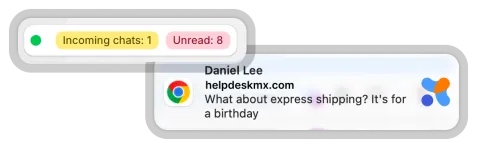
Active Chat Tabs and New Message Indicators

Keep ongoing conversations visible and open any of them instantly. Unread indicators show exactly where a new message came in, so you always know what to open next.

live chat message indicators

Quick Switching Between Conversations

Move between chats without hunting through lists or re-reading the thread every time. You stay in flow during peak hours and keep your attention on the customer, not on navigation.

Canned Responses and Templates

Reply to common questions in seconds with team-approved messages. This keeps wording consistent and leaves more time for requests that need a thoughtful, custom answer.

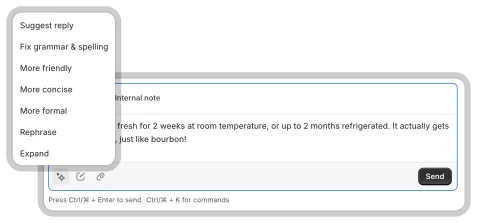
AI Actions Inside the Conversation

Use one-click actions to draft a response, clean up grammar, adjust tone, or translate messages before you send. Choose from preset options like making your reply more formal, friendly, or concise—without rewriting anything yourself.

ai live chat

It's a simple assist that helps you stay professional and consistent when the queue is busy and response time matters.

When conversations follow the same support workflow, it becomes much easier to keep quality steady as volume grows, even when several agents handle multiple threads at once. See how this fits into a complete helpdesk ticketing system designed for e-commerce teams.

Frequently asked questions about Live Chat

Which live chat features matter most for online stores?

Start with what reduces back-and-forth: conversation history, visitor activity, and a simple way to capture the missing detail at the start. These basics help agents understand the situation faster and keep answers consistent when the same person comes back later.

Does real-time chat reduce customer support response time?

Yes, because questions get resolved while the shopper is still on the page, not hours later in an email thread. It is especially helpful for checkout blockers, shipping questions, and quick product clarifications.

Can website live chat capture messages after business hours?

Yes. People can still leave a message, and the conversation stays available for follow-up when your team is back online. This helps you reply with the original context instead of restarting the discussion.

What is the best Shopify live chat app for customer support?

Look for an option that matches how your team works: clear ownership, easy handoffs, and context that stays with the conversation when it continues later. If you want chat built into a helpdesk workflow, see Shopify Helpdesk App.

Ready to Transform Your Customer Support?

Start free and put all your stores, tickets, and chats under one helpdesk you control.